MaxIm DL™
$249.00 USD – $649.00 USD
Cyanogen Imaging® MaxIm DLTM is the complete integrated solution for all of your astronomical imaging needs. Whatever your imaging goals, MaxIm DL Pro includes everything you need to collect, calibrate, process, and analyze your images.
MaxIm DL Version 7
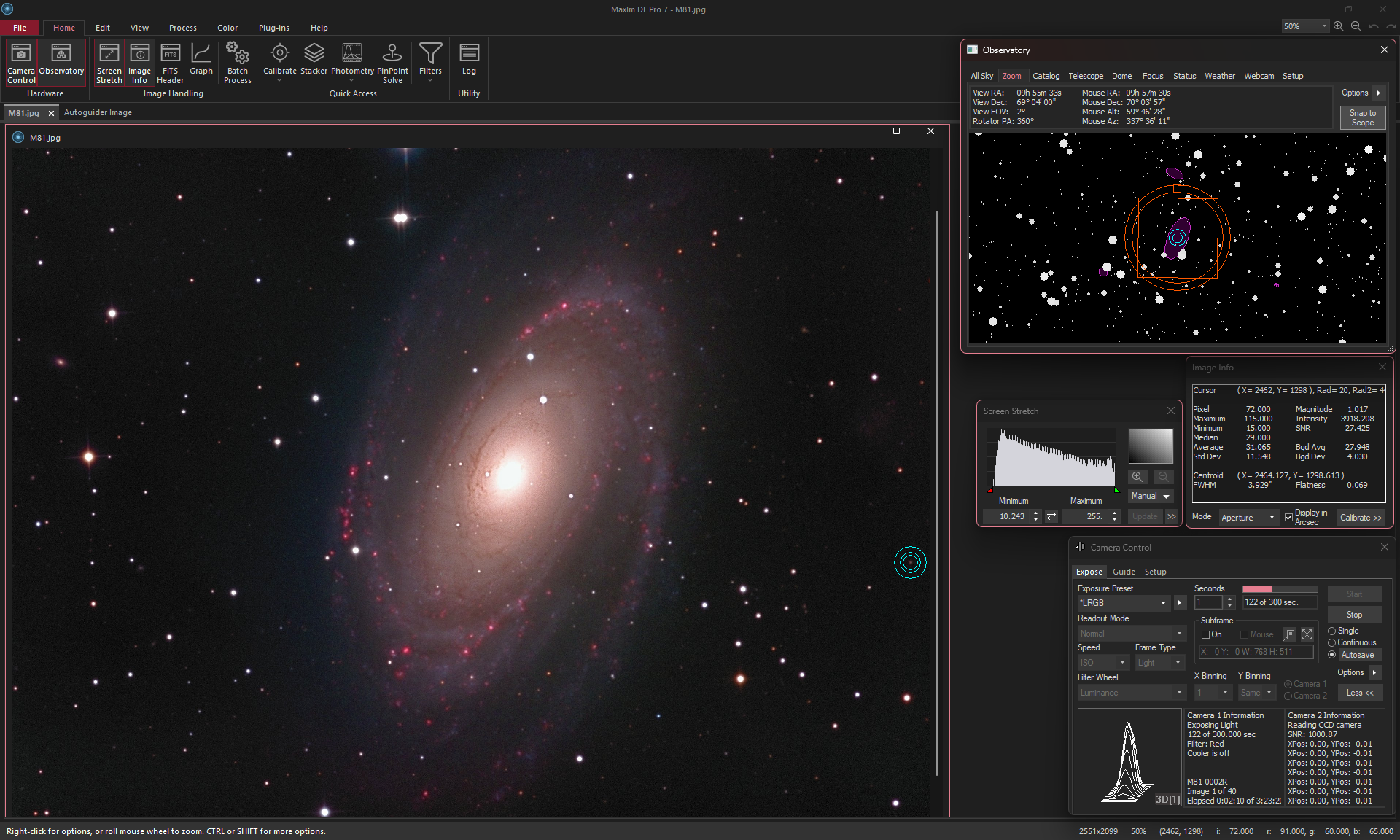
MaxIm DL Version 7 features 64-bit operation with enhanced speed and memory handling – perfect for modern high-resolution cameras. It features a fully modern user interface. Ribbon Bars provide a more convenient, faster access to all functions of the software. Choose between Light Mode for bright daytime use, or Dark Mode which is easier on the eyes and helps preserve night vision.
Product levels available: MaxIm LT (SBIG camera control, webcams, and basic processing only), MaxIm DL IP (image processing only), MaxIm DL Pro (includes all cameras and features), and MaxIm DL Pro Suite (all Pro features plus MaxPoint software, a $50 savings). See Compare tab below for details.
Also available: MaxIm DL Maestro – synchronize multiple cameras operating simultaneously.
Free Trial – click the Free Trial tab below to request your free 30-day full featured trial.
Upgrade NowNo refunds on software after purchase. Please use our free trial to evaluate the software prior to purchase
Product Description
Cyanogen Imaging® MaxIm DL™ includes an extensive suite of image acquisition, processing, and analysis tools. Starting with complete observatory integration, MaxIm DL takes you from gathering raw data through to the final high-quality result with the minimum of effort.
A typical imaging sequence will include hours of autoguided images with dither, automatic filter changes, and pier flipping – all the while slewing your dome and monitoring the weather. Every image is tagged with extensive data in its FITS header. When your weather sensor reports unsafe conditions MaxIm DL will automatically shut down your equipment, park the telescope, and safe the dome.
Once your images are collected, MaxIm DL can automatically assemble your calibration images into groups, select the correct groups for each individual image, calibrate, and stack your images. You can process hundreds of images from different targets with just a few mouse clicks.
MaxIm DL also includes advanced photometry and astrometry capabilities. Photometric measurements are made using best practice median-mean and partial-pixel algorithms vetted by professional astronomers. Astrometric measurements are performed using PinPoint LE, widely recognized as the most powerful and accurate package available today.
MaxIm DL Version 7
MaxIm DL Version 7 features 64-bit operation with enhanced speed and memory handling – perfect for modern high-resolution cameras. It features a fully modern user interface. Ribbon Bars provide a more convenient, faster access to all functions of the software. Choose between Light Mode for bright daytime use, or Dark Mode which is easier on the eyes and helps preserve night vision.
Version 6 remains available for those running old hardware. Both versions can be installed and run simultaneously.
Key Features (MaxIm DL Pro level)
MaxIm DL runs under 64-bit operating systems. Please see System Requirements for more information.
Please see Compare tab above for the feature list for each product level. Additional details are available here.
- Complete observatory integration. Controls all of your astronomical equipment.
- Integrates your camera, autoguider, filter wheels, focusers, camera rotator, telescope mount, observatory webcam, remote switches, weather station, and dome.
- Fully ASCOM compliant.
- Built-in mini-planetarium helps you maintain “situational awareness”.
- Designed for efficiency. Create your own presets for finding, centering, focusing, and imaging sequences.
- Multithreaded hardware interfaces for smooth and responsive operation.
- Automated shutdown with user-definable triggers (including weather) and sequencing.
- PinPoint V7 with online all-sky solving – easily recover if your telescope gets lost.
- Automatic pier flipping with guide star reacquisition.
- Multistar and differential autoguiding.
- Monitor and control your observatory with dome webcam, remote switches, and weather monitoring.
- Stack hundreds of images of different targets in one operation – with automatic alignment and bad data rejection.
- Blend in narrowband data to create fully realistic images or false color representations of your data.
- Includes a complete image processing toolkit, including a large variety of filters, deblooming, curves, deconvolution, color tools, and much more.
- Analyze multispectral photometry data for huge numbers of images including multiple targets; export light curves and AAVSO reports.
- Instant Raw image color preview – see Raw images in full color without Bayer conversion.
Imaging
- Complete integration of all your observatory hardware in a single package.
- Supports your equipment – compatible with more equipment than any competing package. Supports ASCOM equipment plus a huge variety of cameras and filter wheels.
- Multi-threaded equipment control for smoother operation.
- Instant presets for quick changing between find, focus, complex imaging sequences, etc.
- Save and load all program settings – instantly reconfigure for different hardware setups.
- Built-in mini-planetarium provides full “situational awareness” with advanced features such as instant image overlays, FOV indicator with rotator control, extensive catalog search capabilities, and much more.
- Instantly recover from a “lost” telescope with PinPoint V7 online all-sky blind solving.
- Monitor and control your observatory with ASCOM switch controls, observatory webcam, and integrated weather sensors.
- Automatically execute a script for each image to optimize preview or process on the fly.
- Advanced imaging techniques such as dither, automatic per-filter focus offsets, AO control, graphical track logs, audible alarms.
- Highly flexible sequence capability including up to 32 filter/exposure slots and auto-mosaic.
- Improved autoguider support with enhanced reliability and new guiding modes.
- AO and TDI (drift scanning) support.
- Bookmark locations on sky – perfect for session planning and marking unexpected discoveries.
- Automated pier flipping.
- Automated observatory shutdown sequences, including multiple triggers and user-defined sequence.
- Full ASCOM compatibility.
- Compatible with DC-3 Dreams’ ACP browser-based automation tool.
Processing
- Intelligent Calibration™ automatically selects the best bias, dark, and flat-field frames for each individual image. Calibrate both your main camera and autoguider without changing settings.
- Powerful image stacking tool automatically identifies and groups image by target object and filter, automatically rejects poor quality images, and includes multiple automatic and manual alignment modes. Automatically stack and LRGB combine multiple images at once!
- Narrowband image blending tool takes your stacked and aligned image sets and merges them with intensity and wavelength controls. Use realistic or exaggerated wavelength values for optimum discrimination of object features.
- Includes a host of image enhancement filters including:
- Kernel Filters including sharpen, smooth, Gaussian blur, median, dilation, erosion, custom.
- FFT filters
- Unsharp Mask
- Wavelet filters
- Digital Development Processing
- Rank filter
- Local Adaptive filter
- Rotational Gradient filter
- Deconvolution filters
- Background and Gradient Removal
- Easy-to-use Batch processing and advanced scripting capability.
- Color tools include stacking, balance, saturation adjustment, pseudo color, color filter, remove background, realign planes.
- FFT analysis.
- Generate, save, and reuse background flattening profiles for multiple images and targets.
- Complete photometry and astrometry capabilities. Photometry capabilities include unlimited image sets, multispectral analysis, and enhanced target recognition and image quality assessment.
- Other functions include:
- Align
- Stack
- Remove Bad Pixels
- Add Noise
- Remove Bloom
- Remove Pedestal
- Resize
- Histogram Specification
- Curves
- Levels
- Threshold
- Pixel Math
- Mosaic
- Rotation
- Clone, Edit, and Annotation tools
- Preserves the dynamic range of your image with high bit depth floating point processing for both monochrome and color images.
Product Delivery
MaxIm DL is delivered via internet download. Registered users can optionally purchase a USB stick; please contact Diffraction Limited for more information.
Software Returns Policy
All software sales are final.
A free demo period of the MaxIm DL Pro level software, with full technical support is available to determine suitability of the software prior to sale.
Please be aware of the differences in product level before choosing your level for purchase. Lower software levels do not include all features and all equipment control capabilities; however, it may be possible to upgrade at extra cost.
Please note that all software sales are final. No refunds are given on software products. A free demo period with full technical support is available to determine suitability of the software prior to sale. Please be aware that feature availability varies by product level; see the Compare tab above and here for detailed information.
For additional details on product levels, please see the User Manual.
| Major Feature | MaxIm DL IP | MaxIm LT | MaxIm DL Pro | MaxIm DL Maestro |
|---|---|---|---|---|
| Multi-Camera Imaging | YES | |||
| Com/ActiveX Scripting | YES | YES | YES | |
| Image Processing Plug-ins | YES | YES | YES | |
| Third-Party Camera Plug-in Support | YES | YES | ||
| Built-in Planetarium | YES | YES | ||
| Supports third party control software | YES | YES |
| Instrumentation Control | MaxIm DL IP | MaxIm LT | MaxIm DL Pro | MaxIm DL Maestro |
|---|---|---|---|---|
| Scientific-Grade Camera Control* | SBIG* | YES | YES | |
| Webcam Camera Control* | YES | YES | ||
| Filter Wheel Control | SBIG* | YES | YES | |
| Autoguider Control | SBIG* | YES | YES | |
| AO Control | SBIG* | YES | YES | |
| Dome Control | YES | YES | ||
| Focuser Control | YES | YES | ||
| Telescope Control | YES | YES | ||
| Observatory Webcam Display | YES | YES | ||
| ASCOM Switch Control | YES | YES | ||
| Davis Weather Station Integration | YES | YES | ||
| ASCOM Observing Conditions and Safety Integration | YES | YES | ||
| Built-in Catalogs | YES | YES | ||
| Multiple Exposure Presets | YES | YES | YES | |
| Autosave Sequences | YES | YES | YES | |
| Scheduled Exposures (eclipse) | YES | YES | ||
| Visual Focus Tools | YES | YES | YES | |
| Autofocus | YES | YES | ||
| Capture Mosaic | YES | YES | ||
| Dithering | YES | YES | ||
| Astrometric Resynchronization | YES | YES | ||
| Offset Tracking | YES | YES | YES | |
| Guider Filter Compensation | YES | YES | YES | |
| Tracking Error Graph | YES | YES | YES | |
| Tracking Log | YES | YES | YES | |
| Tracking Alarms | YES | YES | YES | |
| Move (via autoguider pulse) | YES | YES | YES | |
| Automatic Star Chart Overlay | YES | YES | ||
| Calibrate Shutter Latency | YES | YES | ||
| Automatic Observatory Shutdown | YES | YES | ||
| Automatic Pointing Refinement | YES | YES | ||
| Automatic Pier Flip | YES | YES | ||
| Automatic Shutdown | YES | YES | ||
| Multi-Star Autoguiding | YES | YES | YES | |
| Differential Autoguiding | YES | YES | YES | |
| Exposure Auto Script | YES | YES |
| File Operations | MaxIm DL IP | MaxIm LT | MaxIm DL Pro | MaxIm DL Maestro |
|---|---|---|---|---|
| Batch Save/Convert | YES | YES | YES | |
| Load/Save Configurations | YES | YES | YES | |
| Run Script | YES | YES | YES |
| Processing and Analysis | MaxIm DL IP | MaxIm LT | MaxIm DL Pro | MaxIm DL Maestro |
|---|---|---|---|---|
| Annotate Images | YES | YES | YES | |
| Mosaic | YES | YES | YES | |
| Graph Window | YES | YES | YES | |
| Virtual Keypad | YES | YES | ||
| PinPoint Astrometry | YES | YES | YES | |
| Photometry | YES | YES | YES | |
| FFT Analysis | YES | YES | YES | |
| Add Noise | YES | YES | YES | |
| Remove Bloom | YES | YES | YES | |
| Histogram Specification | YES | YES | YES | |
| Threshold | YES | YES | YES | |
| FFT Filter | YES | YES | YES | |
| Unsharp Mask Filter | YES | YES* | YES | YES |
| Digital Development | YES | YES* | YES | YES |
| Range-Restricted Filters | YES | YES | YES | |
| Rank Filter | YES | YES | YES | |
| Local Adaptive Filter | YES | YES | YES | |
| Rotational Gradient Filter | YES | YES | YES | |
| Wavelet Filter | YES | YES | YES | |
| Deconvolve | YES | YES | YES | |
| Flatten/Remove Gradient | YES | YES | YES |
| Color Operations | MaxIm DL IP | MaxIm LT | MaxIm DL Pro | MaxIm DL Maestro |
|---|---|---|---|---|
| Color Stack | YES | YES | YES | |
| Pseudo Color | YES | YES | YES | |
| White Balance | YES | YES | YES | |
| Realign Planes | YES | YES | YES | |
| Adjust Saturation | YES | YES | YES | |
| Remove Background Color | YES | YES | YES | |
| Color Smoothing | YES | YES | YES | |
| Color Adjust (graphical) | YES | YES | YES | |
| Narrowband Blending | YES | YES | YES | |
| Quick Color | YES | YES | YES | YES |
To request your MaxIm DL Pro Demo please submit your full name (first and last) and valid email address. You will be emailed the required demo license and a link from which the demo may be downloaded (35 MB download).
The demo is the full MaxIm DL Pro product.
Please be aware of the differences in product level before choosing your level for purchase. Lower software levels do not include all features and all equipment control capabilities; however, it may be possible to upgrade at extra cost.
No refunds are available for software products. See the Compare tab above and here for more detailed information.
"*" indicates required fields
User’s Manual
Installation, and operating instructions for all product tiers of MaxIm DL.
LinkJapanese Manual
MaxIm DL Manual – Japanese translation by Toshihito Watanabe.
LinkGetting Started Guide
Quick start guide for new users of MaxIm DL.
LinkASCOM Platform
In order to control most astronmomical equipment you will need to download and install the ASCOM platform. MaxIm DL V6 requires the ASCOM Platform version 6 or greater.
LinkExtras for MaxIm DL
This page collects together a number of extras including scripts, plug-ins, and third party software that works with MaxIm DL
Link